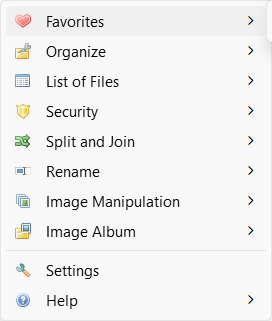
FilerFrog is a free Windows Explorer shell extension built to bake essential file management utilities right into your standard context menu. If you have ever spent hours configuring PowerShell scripts just to sort incoming files, you understand the struggle. Windows Explorer does a decent job for casual tasks, but power users quickly hit its limits.
Native Windows lacks the built-in muscle for heavy automation. FilerFrog fills this gap. Instead of forcing you to open separate applications to rename, resize, or encrypt files, this extension brings those capabilities straight to the files themselves. You get a faster daily workflow without cluttering your system with bloated software.
Batch renaming and organization
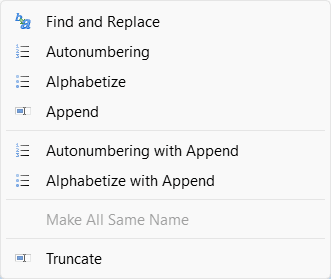
Bulk file handling is where this tool really shines. The batch renaming utility lets you use pattern-based rules or sequential numbering to replace old filenames. You can even preview your changes before applying them to avoid permanent mistakes.
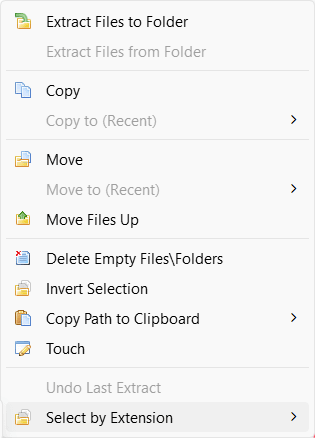
For deeper folder management, the Extract and Organize module saves serious time. A single click pulls files out of deeply nested folders, moves them up one directory level, and deletes the empty folder trees left behind. The extension also includes a Desktop Sorter that automatically groups your messy desktop icons into visual panels, complete with multi-monitor support and an undo function.Image resizing and security tools
FilerFrog packs dedicated utilities for manipulating common image formats like JPG, PNG, BMP, GIF, and TIFF directly from the right-click menu. You can quickly bulk-resize photos, apply text or image watermarks, and generate browsable HTML albums in seconds.
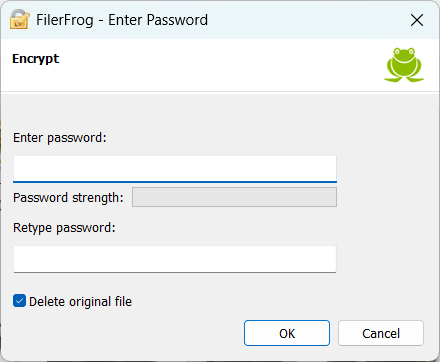
If you handle sensitive data, the built-in security tool lets you password-protect specific files or entire directories using AES-256 encryption. Because everything happens locally, your data stays on your hard drive without ever passing through a cloud server. You can also slice massive files into smaller, fixed-size chunks for easier email sharing, then quickly rejoin them later.Pricing
FilerFrog operates on a completely free licensing model that includes zero telemetry or user tracking. However, it is always recommended to verify the current licensing terms on the official website, as the final cost depends on the tier chosen or active promotions.A practical toolkit for power users
This utility significantly upgrades the default Windows Explorer experience. Putting advanced organization, renaming, and security controls directly into the context menu eliminates the need for a dozen single-purpose apps. Whether you need to tidy up a messy drive or lock down sensitive documents, this lightweight extension earns its keep on any Windows PC.